
Vulhub Manager: A Web Tool for Managing Vulnerable Environments
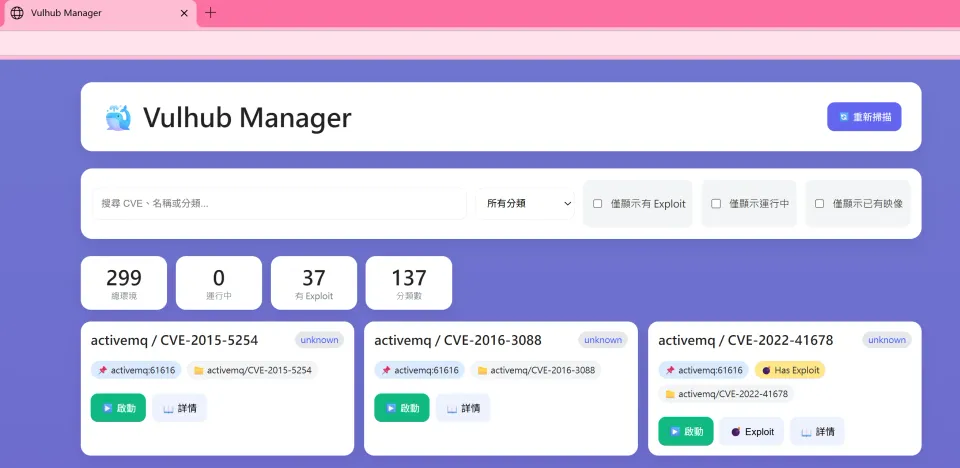
Project link:https://github.com/ironmancool/vulhub-manager
Tech stack:Flask + JavaScript + Docker
License:MIT License
Status:Personal tool — feel free to fork and use it yourself
On the road to learning security, Vulhub is an indispensable tool for many of us. It ships 299 pre-configured vulnerable environments, letting us safely study and test all kinds of security flaws. As the number of environments grows, however, managing them becomes a challenge of its own.
Today I want to share a tool I built myself: Vulhub Manager.
Why do we need Vulhub Manager?
Anyone who has used Vulhub knows that every time you want to spin up a vulnerable environment, you have to:
- Locate the corresponding directory in the file system
- cd into that directory
- Run
docker-compose up -d - Remember the relevant port
- Manually open a browser to reach it
When you have hundreds of environments, just finding the one you want is a hassle — never mind having to remember which environments are running, which ones have an exploit available, which images have already been pulled, and so on.
The birth of Vulhub Manager
Vulhub Manager is a Flask-based web interface that consolidates all of your vulnerable environment management into one clean UI.
Core features
1. Smart environment scanning
The system automatically scans the Vulhub directory, identifies every available environment, and extracts the key information:
- CVE identifier
- Service ports
- README documentation (Chinese version shown first when available)
- Exploit availability
- Docker image status
2. One-click operations
No need to memorize complex commands — every operation is a single click:
- Start an environment: automatically checks for and pulls any missing images
- Stop an environment: cleans up resources
- Open a service: automatically opens a browser to the running service
3. Powerful filtering
When you have 200+ environments, quickly finding the one you need is critical:
// Multi-dimensional filtering
- Search by CVE identifier
- Filter by application category (nginx, apache, tomcat)
- Show only environments that have an exploit
- Show only environments whose images are already downloaded
- Show only running environments
Installation and usage
The project is open-sourced on GitHub: ironmancool/vulhub-manager
# Clone the project
git clone https://github.com/ironmancool/vulhub-manager.git
cd vulhub-manager

# Install dependencies
pip install -r requirements.txt

# Clone Vulhub (if you don't have it yet)
git clone https://github.com/vulhub/vulhub.git

# Start the service
python app.py
Head to http://localhost:5000 and you're good to go.
Design philosophy
1. Simplicity above all
The interface is designed to be clean and intuitive. Every common action can be done from the main page — no multi-level navigation required.
2. Performance first
- Caching brings startup time down from 30 seconds to 1 second
- Pagination shows 20 environments per page, avoiding rendering lag
Closing thoughts
Building Vulhub Manager was a fun experience. It solved a real pain point in my day-to-day Vulhub usage, and I hope it helps other security learners too. The project is fully open source, so feel free to fork it and hack on it yourself. Its value lies in boosting efficiency, so we can focus on what actually matters: studying and researching security vulnerabilities.
Finally, huge thanks to the Vulhub team for building such an excellent collection of vulnerable environments. Without Vulhub, there would be no Manager.
📮 Contact
- Email: [email protected]
Happy Hacking! 🚀
Member discussion