
TryHackMe Ninja Skills Writeup: Finding Files with find, grep, and Permissions

Room Info
- Platform: TryHackMe
- Room Name: Ninja Skills
- Difficulty: Easy
- Goal: Efficiently locate and analyze 12 specified files
- Link: https://tryhackme.com/room/ninjaskills
Objective
We need to find and analyze the following files:
- 8V2L, bny0, c4ZX, D8B3, FHl1, oiMO, PFbD, rmfX, SRSq, uqyw, v2Vb, X1Uy
Step 1: Initial Exploration
Log into the system
ssh new-user@<TARGET_IP>
# password: new-user
Check the current directory
[new-user@ip-10-201-107-70 ~]$ ls -al /home/
total 36
drwxr-xr-x  5 root       root        4096 Oct 23  2019 .
dr-xr-xr-x 25 root       root        4096 Oct 20 07:07 ..
drwx------  3 ec2-user   ec2-user    4096 Oct 23  2019 ec2-user
drwx------  2 newer-user newer-user  4096 Oct 23  2019 newer-user
drwx------  3 new-user   new-user    4096 Oct 23  2019 new-user
-rw-rw-r--  1 new-user   best-group 13545 Oct 23  2019 v2Vb
First find: v2Vb is sitting right there under /home/!
Step 2: Systematically Search for the Files
Approach 1: Search by group
find / -group best-group 2>/dev/null
Result:
/mnt/D8B3
/home/v2Vb
Approach 2: Search by owner
find / -user new-user 2>/dev/null
Result:
/mnt/D8B3
/mnt/c4ZX
/var/FHl1
/opt/PFbD
/opt/oiMO
/media/rmfX
/etc/8V2L
/etc/ssh/SRSq
/var/log/uqyw
/home/v2Vb
Approach 3: Search by filename
find / -name "X1Uy" 2>/dev/null
Result:
/X1Uy
Step 3: Complete File List
| Filename | Location | Owner | Group |
|---|---|---|---|
| 8V2L | /etc/8V2L | new-user | new-user |
| bny0 | ❌ Not found | - | - |
| c4ZX | /mnt/c4ZX | new-user | new-user |
| D8B3 | /mnt/D8B3 | new-user | best-group |
| FHl1 | /var/FHl1 | new-user | new-user |
| oiMO | /opt/oiMO | new-user | new-user |
| PFbD | /opt/PFbD | new-user | new-user |
| rmfX | /media/rmfX | new-user | new-user |
| SRSq | /etc/ssh/SRSq | new-user | new-user |
| uqyw | /var/log/uqyw | new-user | new-user |
| v2Vb | /home/v2Vb | new-user | best-group |
| X1Uy | /X1Uy | newer-user | new-user |
Step 4: Batch-Analyze File Attributes
A one-shot analysis script
for file in /etc/8V2L /mnt/c4ZX /mnt/D8B3 /var/FHl1 /opt/oiMO /opt/PFbD /media/rmfX /etc/ssh/SRSq /var/log/uqyw /home/v2Vb /X1Uy; do
    echo "=== $file ==="
    ls -l $file
    wc -l $file 2>/dev/null
    sha1sum $file 2>/dev/null
    file $file
    echo ""
done
Summary of the key findings
/etc/8V2L: -rwxrwxr-x (executable), 209 lines, SHA1: 0323e62f...
/mnt/c4ZX: -rw-rw-r--, 209 lines, SHA1: 9d54da75... ✓
/opt/oiMO: contains IP: 1.1.1.1 ✓
/X1Uy: Owner UID: 502 ✓
Step 5: Answer the Room Questions
Q1: Which files belong to best-group?
find / -group best-group 2>/dev/null
Answer: D8B3 v2Vb
Q2: Which file contains an IP address?
grep -H '[0-9]\+\.[0-9]\+\.[0-9]\+\.[0-9]\+' /etc/8V2L /mnt/c4ZX /mnt/D8B3 /var/FHl1 /opt/oiMO /opt/PFbD /media/rmfX /etc/ssh/SRSq /var/log/uqyw /home/v2Vb /X1Uy
Result:
/opt/oiMO:wNXbEERat4wE0w/O9Mn1.1.1.1VeiSLv47L4B2Mxy3M0XbCYVf9TSJeg905weaIk
Answer: oiMO
Q3: Which file has the SHA1 hash 9d54da7584015647ba052173b84d45e8007eba94?
sha1sum /etc/8V2L /mnt/c4ZX /mnt/D8B3 /var/FHl1 /opt/oiMO /opt/PFbD /media/rmfX /etc/ssh/SRSq /var/log/uqyw /home/v2Vb /X1Uy 2>/dev/null
Answer: c4ZX

Q4: Which file contains 230 lines?
Since all 11 files we found have 209 lines, by process of elimination:
Answer: bny0
Q5: Which file has owner ID 502?
ls -n /etc/8V2L /mnt/c4ZX /mnt/D8B3 /var/FHl1 /opt/oiMO /opt/PFbD /media/rmfX /etc/ssh/SRSq /var/log/uqyw /home/v2Vb /X1Uy
Result:
-rw-rw-r-- 1 502 501 13545 Oct 23 2019 /X1Uy
Answer: X1Uy
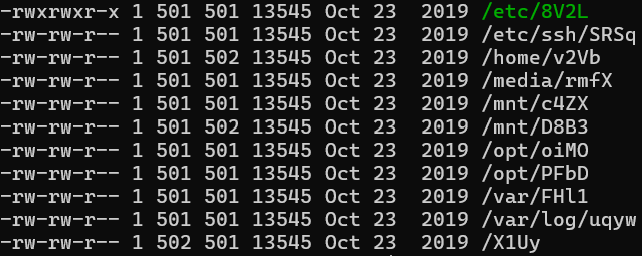
Q6: Which file is executable by everyone?
From the permission analysis:
-rwxrwxr-x 1 501 501 13545 Oct 23 2019 /etc/8V2L
The last three bits, r-x, mean that others have execute permission.
Answer: 8V2L
Technical Takeaways
1. Using find Efficiently
# search by filename
find / -name "filename" 2>/dev/null

# search by owner
find / -user username 2>/dev/null

# search by group
find / -group groupname 2>/dev/null

# search for multiple files at once
find / -type f \( -name "file1" -o -name "file2" \) 2>/dev/null
2. Batch-Analyzing File Attributes
# view detailed permissions and numeric UID/GID
ls -ln filename

# count the number of lines
wc -l filename

# compute the SHA1 hash
sha1sum filename

# check the file type
file filename
3. Content-Search Tricks
# search for IP addresses
grep -H '[0-9]\+\.[0-9]\+\.[0-9]\+\.[0-9]\+' files

# search across multiple files
grep -r "pattern" /path/
4. Understanding Linux Permissions
rwxrwxrwx= Owner / Group / Others- An
xin the third group (others) = everyone can execute ls -nshows numeric UID/GID instead of names
Lessons Learned
The author of this box was pretty adorable while working through it. I kept sitting in the /files path waiting for the files to show up, thought the box was broken, and even restarted it once. Then I finally did cd home and discovered the first file, v2Vb. From there I used the methods above to hunt them all down one by one!
Member discussion