
Disk Internals & Data Recovery (3): Recovering Five Photos from a Memory Card
Disclaimer: The practice disk image in this post is one I made myself — a 64MB fake memory card image — so nothing here touches a real hard drive. The pass codes printed on the five photos are all masked out as Redacted. If you want to try it yourself first, the practice disk image is right below, and the challenge setup is in the next section.
Why lesson three is about photos
The first two lessons were both ext4. This one switches to FAT32, and the reason is simple: in the real world, the thing people most often ask you to recover is photos, and photos almost always live on FAT32 memory cards.
The setup for the practice disk image: a camera memory card. The owner says it had five photos on it, but now only two are visible. Five photos, five different situations, from easy to hard:
- Level 0: a normal photo that was never deleted
- Level 1: a photo that was deleted the normal way
- Level 2: a photo that doesn't even have a filename
- Level 3: a photo that was deleted and is split into two pieces
- Level 4: a photo you can see but can't open
Each photo has a pass code printed on it. Recover it, get it to open, read the code, and you've cleared that level.
Key point: this lesson uses only two tools, Sleuth Kit and grep. No PhotoRec. Walk through it by hand once first; that way, when you do reach for an automated tool later, you'll know what it's doing for you — and where it's lying to you.
Environment
cp /mnt/d/Download/roulab-recovery-1.img.gz ~/lab/ && cd ~/lab
gunzip roulab-recovery-1.img.gz
md5sum roulab-recovery-1.img
The md5 should be 6005d8729e0b4ef806e42daea12f2719. This image is evidence: we never write to it at any point, and all output gets saved separately to ~/lab/out/.
mmls roulab-recovery-1.img
      Slot      Start        End          Length       Description
000:  Meta      0000000000   0000000000   0000000001   Primary Table (#0)
001:  -------   0000000000   0000002047   0000002048   Unallocated
002:  000:000   0000002048   0000131071   0000129024   Win95 FAT32 (0x0c)
As before, the partition starts at 2048, so every command from here on carries -o 2048. The difference is in the last column: Win95 FAT32 (0x0c), not Linux.
Step 1: Take roll call
fls -o 2048 -r -p roulab-recovery-1.img
r/r 3:  ROULAB      (Volume Label Entry)
d/d 4:  DCIM
d/d 21: DCIM/100LAB
r/r 37: DCIM/100LAB/IMG_0000.JPG
r/r * 38:       DCIM/100LAB/_MG_0001.JPG
r/r * 39:       DCIM/100LAB/_MG_0003.JPG
r/r * 40:       DCIM/100LAB/_ID_0001.BIN
r/r 41: DCIM/100LAB/IMG_0004.JPG
v/v 2032099:    $MBR
v/v 2032100:    $FAT1
v/v 2032101:    $FAT2
V/V 2032102:    $OrphanFiles
Three things to notice:
$FAT1,$FAT2: FAT's ledger (which slot links to which) sits in its entirety at the very front of the disk, and it's written twice — the second copy is a backup.- The starred names have their first character turned into an underscore:
_MG_0001.JPGwas originallyIMG_0001.JPG. When FAT deletes a file, it only changes the first byte of the filename to0xE5, meaning "this entry is free"; the other 10 characters, the size, the timestamps, and the location of the first cluster all stay right where they were. When TSK sees0xE5, it displays it as an underscore. IMG_0002is missing: 0000, 0001, 0003, and 0004 are all there, but there's no 0002, not even an underscore version. The directory has no entry for it at all.
Key point: this is the difference between the three kinds of "missing." For 0001 and 0003, the entry is still there, just marked as reclaimable; for 0002, the entry itself is gone — the ledger has no idea it exists, and all that may be left is its contents, still scattered somewhere on the disk.
Step 2: Level 0, calibrate your instruments
Level 0 isn't a recovery; it's a check on your process. When you get a disk, first find a perfectly healthy file and walk it through the whole process: confirm the tools read it correctly, the offset is right, and what you dump out actually opens. Once this level passes, if an image you recover later won't open, you know the problem is the image, not your process.
istat -o 2048 roulab-recovery-1.img 37
Directory Entry: 37
Allocated
File Attributes: File, Archive
Size: 223671
Name: IMG_0000.JPG
...
Sectors:
2021 2022 2023 2024 2025 2026 2027 2028
...
2453 2454 2455 2456 2457
Size is 223671, and the Sectors run consecutively from 2021 all the way to 2457. Count them: 2457 − 2021 + 1 = 437 slots × 512 = 223744 bytes, just enough to hold 223671. This is what a "healthy file" looks like: wherever the ledger says it is, the data sits there in one contiguous run. Every level after this gets measured against this baseline.
On this disk a cluster is 512 bytes, the same size as a sector, so the sector numbers istat prints can be used directly as cluster numbers.
Is 38 an inode?
Compare this with lesson one: ext4 takes three steps — name → inode (the card) → block (the contents). FAT has no separate card. The name, size, timestamps, and the location of the first slot are all crammed into a single 32-byte entry in the directory. So that you can use the same set of commands, TSK numbers these entries itself: 38 is the number TSK gave that entry. FAT itself has no such number.
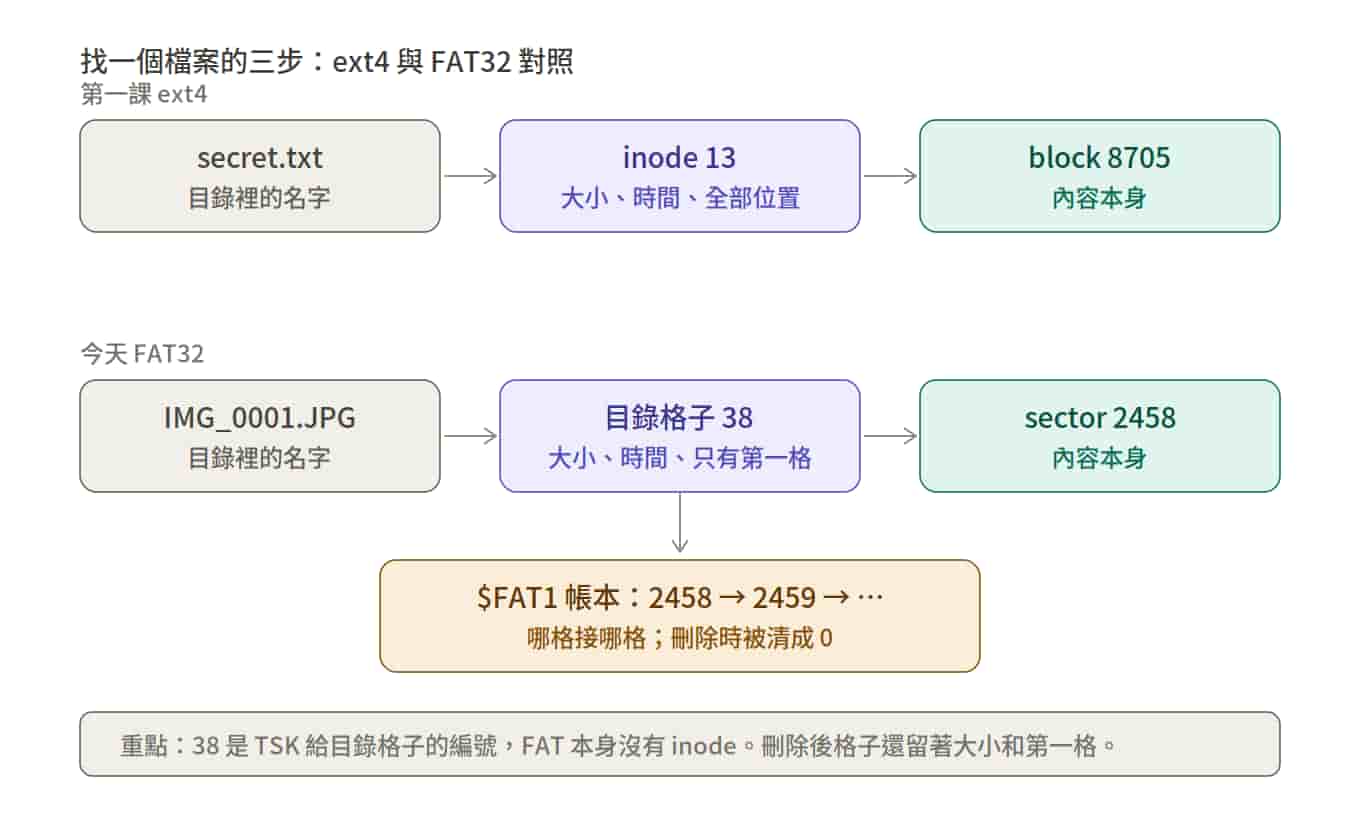
The difference is in the last piece: ext4 writes "which slots hold the contents" entirely in the inode; FAT only writes "the first slot" in the entry, and for the second slot onward you have to look it up in the $FAT1 ledger.
Dump it out, and copy it over to Windows while you're at it so you can view the image:
mkdir -p ~/lab/out
icat -o 2048 roulab-recovery-1.img 37 > ~/lab/out/L0.jpg
cp ~/lab/out/L0.jpg /mnt/d/Download/
file ~/lab/out/L0.jpg
L0.jpg: JPEG image data, JFIF standard 1.01, ... 1024x768, components 3
Open it: pass code Redacted. The instruments check out.
Step 3: Level 1, a normal deletion
istat -o 2048 roulab-recovery-1.img 38
Directory Entry: 38
Not Allocated
File Attributes: File, Archive
Size: 213350
Name: _MG_0001.JPG
...
Sectors:
2458 2459 2460 2461 2462 2463 2464 2465
...
2874
It looks almost identical to Level 0: the Size is still there, the timestamps are still there, and the Sectors are one long consecutive run too. The only difference is a single line: Not Allocated.
But this run of Sectors comes from a different source. In Level 0, TSK read that run off the ledger, slot by slot. When this photo was deleted, its chain in the ledger was zeroed out, so all TSK has left are two numbers from the directory entry: first slot 2458, size 213350. So it assumes "the file is contiguous," counts 417 slots forward on its own, and fills them in for you.
Key point: the Sectors under Not Allocated are TSK's guess, not a record. This photo happens to be contiguous, so the guess is right. In Level 3, it won't be.
While we're at it, let's put deletion on the two filesystems side by side:
- ext4 deletion: the whole inode is wiped and all the location info is gone (we saw this with our own eyes in lesson one; only the journal still had a backup)
- FAT deletion: only the first character of the entry gets blotted out, the first slot and the size are both still there, and only the chain in the ledger gets zeroed out
While a file is alive, FAT keeps less information about it than ext4 does; once it's dead, FAT actually leaves more behind.
icat -o 2048 roulab-recovery-1.img 38 > ~/lab/out/L1.jpg
cp ~/lab/out/L1.jpg /mnt/d/Download/
file ~/lab/out/L1.jpg
It opens: pass code Redacted. Level 1 cleared.
Step 4: Level 2, no name
0002 doesn't even have a directory entry, so fls, istat, and icat are all useless — every one of them relies on the ledger. The only clue left is the contents themselves.
To search by content, you first need to know what a JPEG looks like. Take the healthy one from Level 0 and look at its head and tail:
xxd -l 16 ~/lab/out/L0.jpg
xxd ~/lab/out/L0.jpg | tail -1
00000000: ffd8 ffe0 0010 4a46 4946 0001 0100 0001  ......JFIF......
000369b0: bf56 f57e 67ff d9                        .V.~g..
Every JPEG starts with ff d8 ff and ends with ff d9. This is called a file signature. It lives at the file format layer and has nothing to do with the filesystem, so it's still there even after the ledger is gone.
Let's get two terms straight here, since both will come up from now on:
- Filesystem (ext4, FAT32, NTFS): the ledger rules that track "where on the disk each file is stored"
- File format (JPEG, PNG): how the contents of the file itself are laid out
How the ledger is kept is the filesystem's business; what the contents look like is the file format's business. When you're recovering data, you have to look at both layers.
In lesson one we used grep -a -b to search the whole disk for text. This time we're searching for bytes, so the command changes a little:
LC_ALL=C grep -obUaP '\xff\xd8\xff' roulab-recovery-1.img
2083328:���
2307072:���
2520576:���
42991616:���
-o prints only the match, -b prints the byte offset, and -P lets you write bytes as \xff.
Four hits. Next comes process of elimination: three of the four are photos we already know, and whatever's left over is 0002. The conversion is the same as in lesson one: byte offset ÷ 512 = sector number on the whole disk, then subtract 2048 = the sector number istat shows.
- 2083328 → 4069 − 2048 = 2021 → first slot of IMG_0000
- 2307072 → 4506 − 2048 = 2458 → first slot of _MG_0001
- 2520576 → 4923 − 2048 = 2875 → first slot of _MG_0003 (you'll see it shortly in istat 39)
- 42991616 → 83968 − 2048 = 81920 → far away from everyone else, and nobody claims it
81920 is the head of 0002.
One loose end to flag while we're here: there's clearly also an IMG_0004.JPG alive and well on the disk, so why only four hits? Hold that thought; we'll come back to it in Level 4.
We know where it starts, but there's no directory entry to tell us how big it is. So look for the tail instead: the first ff d9 after 42991616.
LC_ALL=C grep -obUaP '\xff\xd9' roulab-recovery-1.img | awk -F: '$1 > 42991616 {print $1; exit}'
43224787
Beginner pitfall: "searching forward" only works if the file is contiguous. Treating the whole stretch from head to tail as 0002 relies on the file lying in one continuous run from start to finish. When a file is split into two pieces, the second piece might sit before the head, or somewhere far away, and "search forward from the head for the first ff d9" will cut at someone else's tail. This is a built-in limitation of carving, and you'll run into it yourself in Level 3.
Cut it out. 43224787 is where the ff is, and the d9 is one byte after it, so the tail needs +2:
dd if=roulab-recovery-1.img of=~/lab/out/L2.jpg bs=1 skip=42991616 count=$((43224787 + 2 - 42991616)) status=none
cp ~/lab/out/L2.jpg /mnt/d/Download/
file ~/lab/out/L2.jpg
It opens: pass code Redacted. This level didn't touch the ledger at all — it was recovered purely from the file format.
The real world adds one more pitfall: JPEGs shot on a camera embed a thumbnail, and the thumbnail has its own ff d9. "The first ff d9" might be the thumbnail's tail, and all you cut out is a tiny image. This practice disk image has no thumbnails, but a real camera's memory card will.
Step 5: Level 4, a broken header (0004 first)
Back to that loose end: according to the ledger, IMG_0004.JPG is alive and well, yet searching for ff d8 ff doesn't find it. Run it through the Level 0 process:
icat -o 2048 roulab-recovery-1.img 41 > ~/lab/out/L4.jpg
file ~/lab/out/L4.jpg
xxd -l 16 ~/lab/out/L4.jpg
L4.jpg: data
00000000: 0000 0000 0010 4a46 4946 0001 0100 0001  ......JFIF......
file can't identify it because the signature is gone. Only the first 4 bytes have turned into 0; from the 5th byte on, 0010 4a46 4946 is exactly the same as in Level 0. Image viewers also look at those first 4 bytes to decide whether to bother with a file at all.
This kind of "only a small chunk at the start is broken" damage is very common: a bad sector happens to land on the first sector, or another file briefly wrote over it. The remaining 99.9% of the data is fine; nothing is willing to open it, that's all.
The fix is to put those 4 bytes back, and the start of the Level 0 photo has already told you what they should be. Write to the copy and leave the evidence untouched:
printf '\xff\xd8\xff\xe0' | dd of=~/lab/out/L4.jpg bs=1 conv=notrunc status=none
file ~/lab/out/L4.jpg
cp ~/lab/out/L4.jpg /mnt/d/Download/
conv=notrunc is the key: it overwrites only the first 4 bytes without truncating the file. It opens: pass code Redacted.
Step 6: Level 3, split in two (then 0003)
The hardest level. First we hit the wall, then we take it apart.
istat -o 2048 roulab-recovery-1.img 39 | head -20
icat -o 2048 roulab-recovery-1.img 39 > ~/lab/out/L3-naive.jpg
file ~/lab/out/L3-naive.jpg
Directory Entry: 39
Not Allocated
Size: 202464
Name: _MG_0003.JPG
Sectors:
2875 2876 2877 2878 ...
L3-naive.jpg: JPEG image data, JFIF standard 1.01, ... 1024x768, components 3
istat says one consecutive run, file says it's a normal JPEG, and the size is right too. Every instrument is showing green. Open it, and there's only the top half; the bottom half is noise.
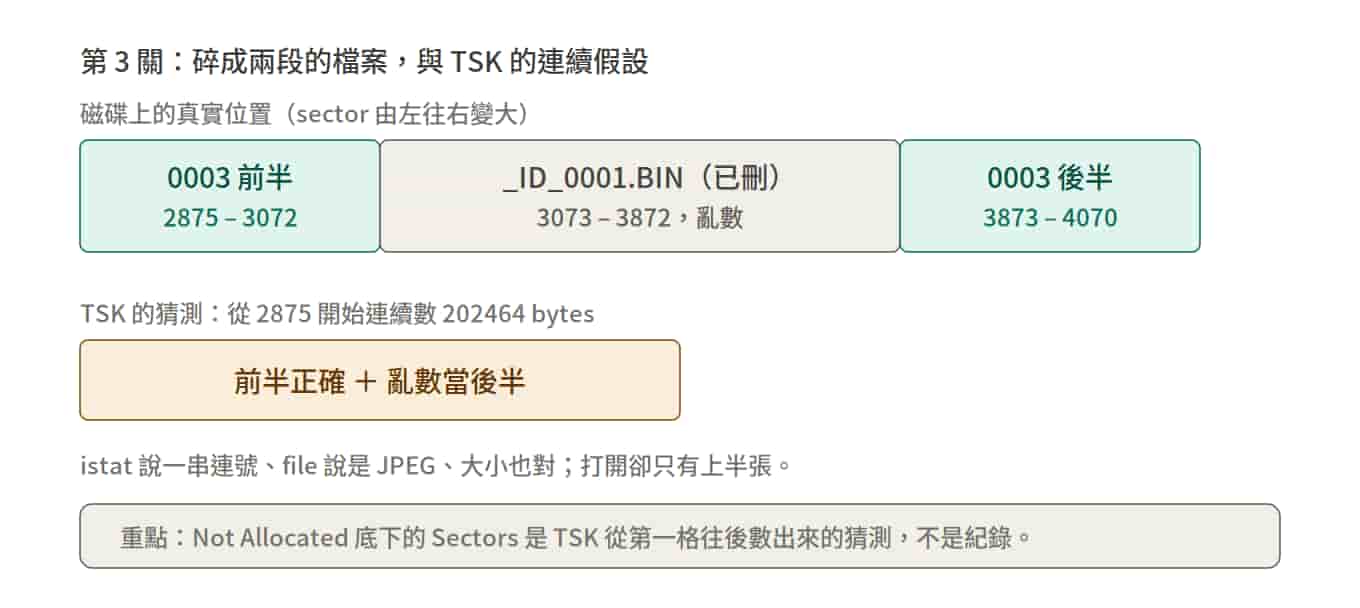
What actually happened: halfway through writing 0003, another file (_ID_0001.BIN) cut in and took the space right after it, so the second half of 0003 had to jump further ahead. The ledger originally recorded that jump, but it was zeroed out on deletion, so TSK can only count forward from 2875. Once it counts past the end of the first half, what it picks up next is the BIN's random data. The JPEG decoder gives up the moment it hits random data, which is why you see half a picture.
To fix it, you have to answer two questions.
Where does the first half end?
The clue is the file that cut in line. It has a directory entry too, number 40:
istat -o 2048 roulab-recovery-1.img 40 | head -14
Directory Entry: 40
Not Allocated
Size: 409600
Name: _ID_0001.BIN
Sectors:
3073 3074 3075 3076 ...
It starts at 3073, and its Size of 409600 is exactly 800 slots (409600 ÷ 512 = 800), so it occupies 3073 through 3872.
That makes the first half of 0003 run from 2875 through 3072: 3072 − 2875 + 1 = 198 slots × 512 = 101376 bytes. This stretch is contiguous, and it's the part TSK guessed right.
Where is the second half?
Think about how 0003 was written in the first place: at 3072 it found the next slot taken by the BIN. FAT's habit is to "find the next free slot and keep going," and the first free slot after the BIN is 3873. The most reasonable guess: the second half starts at 3873 and runs contiguously to the end.
But that's a guess, and it needs to be verified. You already learned how in Level 2: if the second half really starts at 3873 and its length is exactly the remaining bytes, then ff d9 should show up at precisely the position we calculate — not a byte earlier, not a byte later.
Remaining bytes: 202464 − 101376 = 101088. Divided by 512, that's 197 slots with 224 left over, so the last slot only uses 224 bytes and the other 288 bytes are empty. Just like the 437 slots holding 223671 bytes in Level 0, the last slot never comes out exactly full.
The expected position of ff d9:
(2048 + 3873) × 512 + 101088 − 2 = 3132638
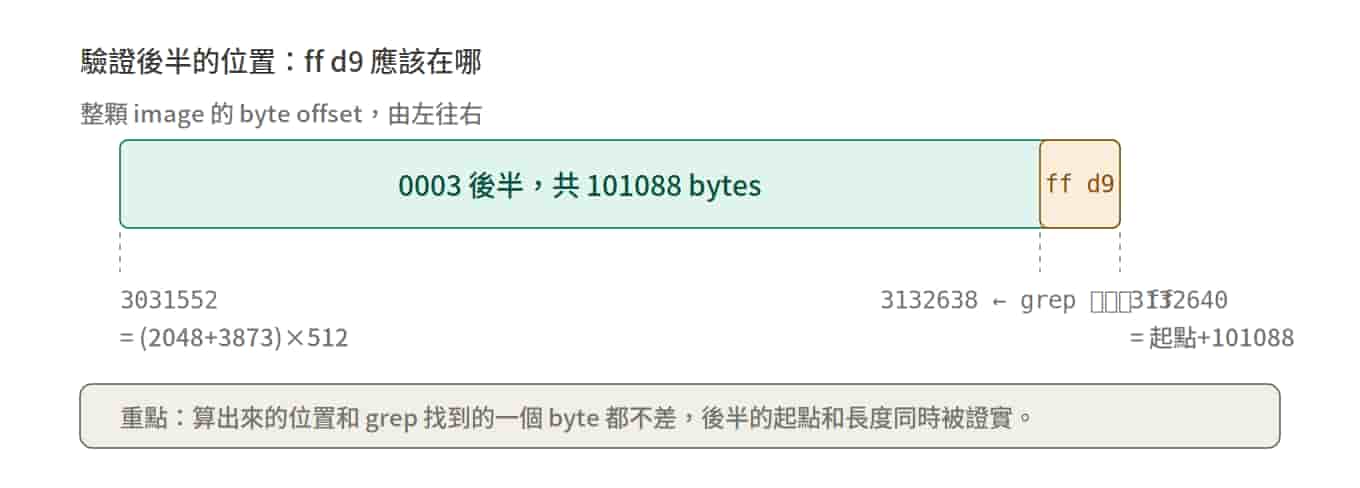
Each of the three parts does one job:
- (2048 + 3873) × 512 turns "slot 3873 of the partition" into a byte offset in the whole image. It's the reverse of the conversion from Level 2: back then it was ÷ 512 and then − 2048; now it's + 2048 and then × 512. That gives 3031552, the start of the second half.
- 101088 walks from that starting point through the entire second half, landing on 3132640. That number is "the first byte after the file ends," so it isn't part of the file.
- − 2 because the file's last two bytes are
ff d9:d9is at 3132639 andffis at 3132638. grep reports the position of theff, so we step back 2.
Verify it:
LC_ALL=C grep -obUaP '\xff\xd9' roulab-recovery-1.img | awk -F: '$1 > 3031552 {print $1; exit}'
3132638
Not a single byte off. A match this exact is no coincidence: start at 3873, walk 101088 bytes, and the last two bytes turn out to be exactly the JPEG end marker. The position and the length of the second half are confirmed in one go.
Stitch it back together
All three numbers have been verified: the first half is 198 slots starting at 2875, and the second half is 101088 bytes starting at 3873. Two dd commands, with their output going into the same file one after the other:
( dd if=roulab-recovery-1.img bs=512 skip=$((2048+2875)) count=198 status=none; dd if=roulab-recovery-1.img bs=1 skip=3031552 count=101088 status=none ) > ~/lab/out/L3.jpg
file ~/lab/out/L3.jpg
ls -l ~/lab/out/L3.jpg
cp ~/lab/out/L3.jpg /mnt/d/Download/
The first half is taken in whole slots, so it uses bs=512; the second half's tail doesn't fill a whole slot, so it switches to bs=1 to cut precisely. ls -l shows 202464, the same as the Size in the directory entry. Open it, and the bottom half is back: pass code Redacted.
Wrap-up
Five things this practice disk image teaches:
- Recovery means looking at two layers: the filesystem's ledger and the file format's contents. When the ledger is broken, find the file by its format (Level 2); when the format is broken, find it through the ledger and then repair it (Level 4)
- FAT deletion only blots out the first character of the filename; the first slot and the size are both still there, so it leaves more behind than ext4 does. That's why icat can recover a contiguous file directly
- The Sectors under
Not Allocatedare a guess TSK makes by counting forward from the first slot, not a record. A tool showing green doesn't mean it's right - Carving assumes the file is contiguous. For a fragmented file, you need the neighbor's directory entry and the file format's tail together to track down the second piece
- Every guess has to be verified. It only holds up when the position you calculated and the one grep finds line up without being off by a single byte
Happy Carving!
Member discussion