> ## Content Index
> Fetch the complete content index at: https://taiwanding.com/llms.txt
> Use this file to discover other available public pages before exploring further.
# Vulnmachines OSINT Series - Complete Writeup (All 6 Flags)
- URL: https://taiwanding.com/en/vulnmachines-osint-series-writeup/
- Published: 2025-09-08T07:38:31.000Z
- Updated: 2026-07-15T02:49:47.000Z
- Author: Kevin Chen
- Tags: #en, #en-ctf
## **Challenge Info**
- **Platform**: Vulnmachines
- **Category**: OSINT (Open Source Intelligence)
- **Series**: 5 challenges, 6 flags
- **Challenge link**: [https://account.vulnmachines.com/user/challenges](https://account.vulnmachines.com/user/challenges?ref=taiwanding.com)
- **Description**: "OSINTOrg has created some cool badges. You need to perform an open-source intelligence assessment on their organization and find out about their internet presence and employee information to get the flags and the cool badges."
- Note: OSINT is a really fun hands-on exploration process. I'd recommend giving it a shot yourself before reading on.
## **Initial Analysis and Strategy**
### **Starting from Scratch**
After receiving the challenge, all we know is:
1. There's an organization called **OSINTOrg**
2. They've made some badges
3. We need to investigate their internet footprint and employee information
## **OSINT Lab 1, 2**
**Goal**: Find the organization's social media accounts and employee profiles
### **Step 1: Use a Username Checker Tool**
First, let's run an automated search using NameCheckerr:
```
Visit: https://namecheckerr.com/
Enter: OSINTOrg
```
**Results analysis**:
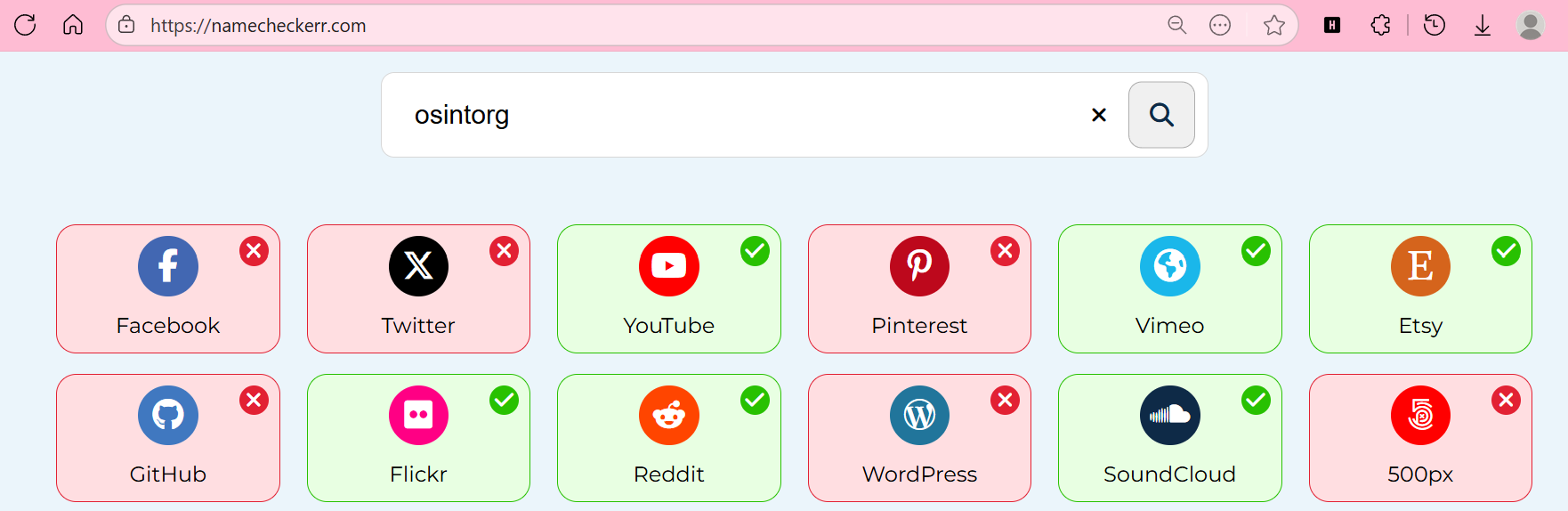
```
✅ Registered:
- Twitter/X: @OSINTOrg
- GitHub: github.com/osintorg
```
### **Step 2: Dig into Twitter**
Visit `https://twitter.com/OSINTOrg`
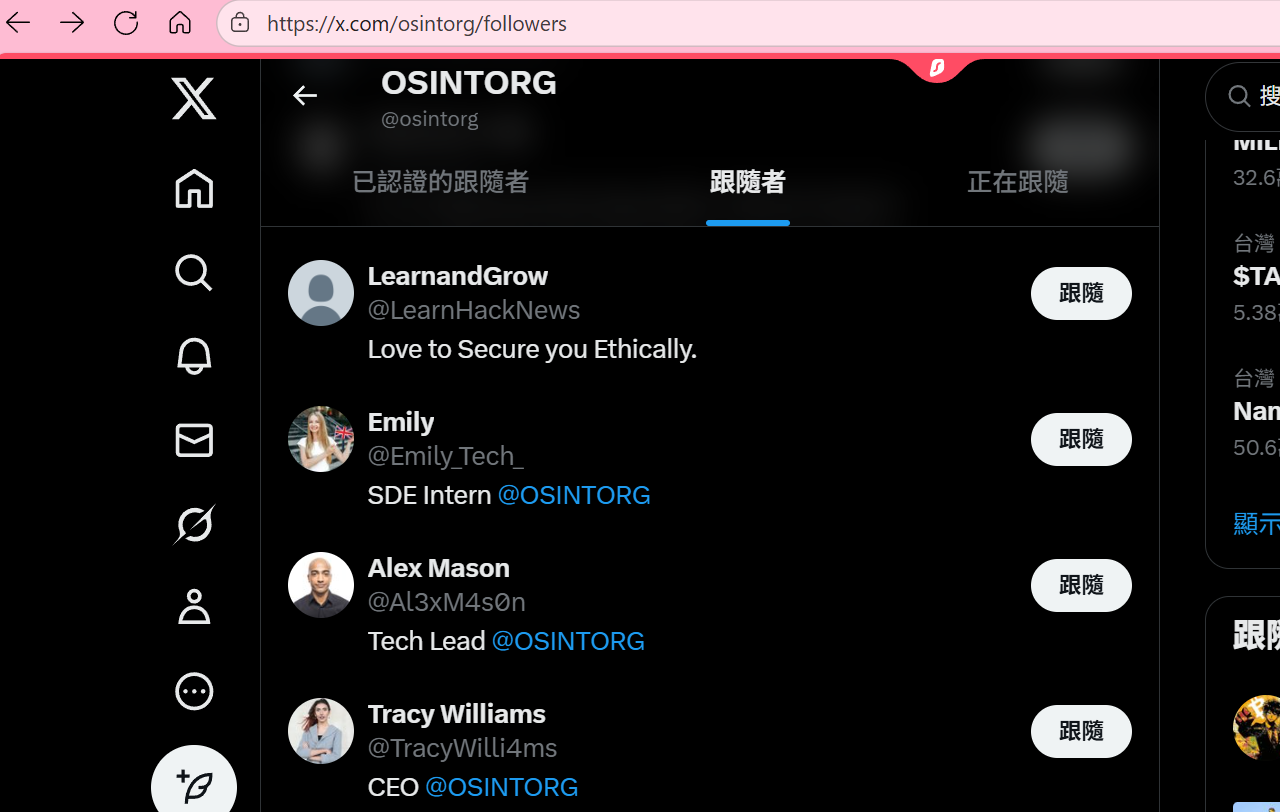
**Key findings**:
```
Organization account: @OSINTOrg
Followers include employees:
- Alex Mason (@Al3xM4s0n) - Bio: "Tech Lead @OSINTOrg"
- Emily (@Emily_Tech_) - Bio: "SDE Intern @OSINTOrg"
```
### **Step 3: Analyze Employee Interactions**
Check out Alex Mason's tweets:
```
Alex Mason @Al3xM4s0n
We would to let you know that we have started our development journey for @osintorg.
Visit our GitHub profile here: https://github.com/orgs/osintorg/dashboard
```
Emily's reply reveals the organization's structure and division of work, and flag1 can be found in the comments.
> We would to let you know that we have started our development journey for [@osintorg](https://twitter.com/osintorg?ref%5Fsrc=twsrc%5Etfw&ref=taiwanding.com). Visit our GitHub profile here: [https://t.co/QVygQzlKBN](https://t.co/QVygQzlKBN?ref=taiwanding.com)
>
> — Alex Mason (@Al3xM4s0n) [January 17, 2023](https://twitter.com/Al3xM4s0n/status/1615294649358516225?ref%5Fsrc=twsrc%5Etfw&ref=taiwanding.com)
### **Step 4: Explore the GitHub Organization**
Visit the GitHub organization page:
```
https://github.com/osintorg
```
**Members discovered**:
- `emilyosintorg` \- Emily's GitHub account
- `alexosintorg` \- Alex Mason's GitHub account
### **Step 5: Gist Recon**
OSINT tip: developers often share code snippets in Gists, which may contain sensitive information.
Visit Emily's Gists:
```
https://gist.github.com/emilyosintorg
```
We find `favicon.js`:
**Key: check the comments section!** That's where flag2 is.
---
## **OSINT Lab 3 - Finding Secrets**
**Goal**: Find the hosted service (Jenkins) and enumerate it
### **Step 1: Analyze the Clues in the Gist**
Back in Emily's `favicon.js` Gist, there's another comment from Alex:
```
The Jenkins URL is now set to: osintorg-{github-username}-prod.domain-name
```
### **Step 2: Construct the Jenkins URL**
Based on the format, the possible URLs are:
```
osintorg-emilyosintorg-prod.osintorg.com
osintorg-alexosintorg-prod.osintorg.com
```
### **Step 3: Port** 8080
Jenkins's default port is 8080:
```bash
# Test with a browser or curl
http://osintorg-emilyosintorg-prod.osintorg.com:8080/
```
**Success! The Jenkins instance is accessible without authentication.**
### **Step 4: Jenkins Enumeration**
Navigation path:
```
Jenkins home → left-hand menu → Credentials
```
**What we find on the Credentials page**:
```
Domain: (global)
ID: vnm{open_things_can_lead_to_more_open_things}
Name: vnm{open_things_can_lead_to_more_open_things}
Type: Username with password
```
flag3 is right here.
### **Bonus find**: a hint telling you where to grab the full-access flag
```
Another Credential:
ID: d9ffec32-ef0d-4fcc-aeff-1dabbe70aeb9
Name: FullBadgeAccess
Description: Get full badge access from bucket badge-fullaccess.amazon.com
```
---
## **OSINT Lab 4 - Cloud Asset Discovery**
**Goal**: Identify cloud assets
### **Step 1: Check the Jenkins Build Logs**
```
Click prod-env-jenkins → Build History → #8 → Console Output
```
**Key info in the logs**:
```
Publish artifacts to S3 Bucket Using S3 profile: s3-osint-jenkins
```
### **Step 2: S3 Bucket Enumeration**
**Method 1: Access via browser**
```
https://s3-osint-jenkins.s3.amazonaws.com/
```
XML response:
```xml
FLAG.txt
2023-06-26T08:58:55.000Z
```
[https://s3-osint-jenkins.s3.amazonaws.com/FLAG.txt](https://s3-osint-jenkins.s3.amazonaws.com/FLAG.txt?ref=taiwanding.com)
That's flag4.
## **Badge Hacking - The Combined Challenge**
### **Limited Access Badge -**
#### **The Early Struggle**
So far we've found:
- Emily (emilyosintorg)
- Alex Mason (alexosintorg)
But the Limited Access flag just wouldn't turn up...
#### **The Breakthrough: Look for Other Employees**
**Expanded search strategy**:
```
Original pattern:
- emilyosintorg
- alexosintorg
```
**Found AlexbadgeOsintOrg — spotted in the company's follower list!**
[Build software better, togetherGitHub is where people build software. More than 150 million people use GitHub to discover, fork, and contribute to over 420 million projects.GitHub](https://github.com/orgs/osintorg/followers?ref=taiwanding.com)
```
https://github.com/AlexbadgeOsintOrg
```
This is another Alex account, dedicated specifically to badge-related development!
#### **Check the Repository**
```
Repository: badge
Commit: Create Limited Badge Access (4aba24c)
https://github.com/AlexbadgeOsintOrg/badge/commit/4aba24c
```
The flag is right there in the commit contents!
**🚩 Flag 5: Limited Access Badge flag**
### **Full Access Badge**
#### **Step 1: Find More Clues**
During the search, Emily's Gist turned up a JavaScript file containing an S3 link:
[This will lead to badge disclosureThis will lead to badge disclosure . GitHub Gist: instantly share code, notes, and snippets.Gist262588213843476](https://gist.github.com/emilyosintorg/e850c8c4f80639ae841e198206566f0f?ref=taiwanding.com)
```javascript
//jenkins badge-access: https://badge-fullaccess.s3.amazonaws.com/
import React, { useEffect, useState } from 'react'
// ... code contents ...
```
#### **Step 2: Access the S3 Bucket**
```
https://badge-fullaccess.s3.amazonaws.com/
```
XML response:
```xml
s3cr3t.txt
2023-01-17T09:07:45.000Z
```
#### **Step 3: Grab the Flag**
```
https://badge-fullaccess.s3.amazonaws.com/s3cr3t.txt
```
**🚩 Flag 6: Full Access Badge flag**
---
## **Tools and Techniques Summary**
### **Essential Tools**
```bash
# Username search
- NameCheckerr (https://namecheckerr.com/)
# GitHub recon
- Direct search: github.com/search
- Gist search: gist.github.com/search
# S3 Bucket exploration
- Browser: https://bucket-name.s3.amazonaws.com/
# Port scanning
- nmap -p 8080 domain.com
- or just test in the browser
```
## **Solution Flowchart**
```
OSINTOrg
├── Social Media
│ ├── Twitter → employee accounts → Flag in conversation
│ └── LinkedIn (optional)
├── GitHub
│ ├── Organization → member list
│ └── Gists → Flag in comments + Jenkins clue
├── Jenkins
│ ├── Port 8080
│ ├── Credentials → Flag
│ └── Build Logs → S3 Bucket clue
└── AWS S3
├── s3-osint-jenkins → Flag
└── badge-fullaccess → Flag
```
## **Conclusion**
This OSINT series cleverly simulates a real-world information-gathering scenario. It starts with the most basic social media searches, gradually works its way into exploring technical assets, and finally requires you to combine every skill to complete the Badge Hacking challenge.
## Lessons Learned:
The most interesting parts of this challenge all revolve around GitHub:
1. Searching public Gists
2. Using the organization's GitHub to find other company employees
3. Being able to view past commits in a repository
And that's a wrap!